Peer to peer shared memory for AI agents

HiveMind lets every agent on every machine remember what the others have learned, automatically, with no central server.

Install in one command ★ Star on GitHub ♥ Sponsor

What you get

Coordinate without a coordinator

Agents work in concert through the shared hive, not a central boss. No leader, no lock server, no single point of failure. Every device is equal.

Learn more →

Syncs automatically

When one agent learns something, every other agent on every machine gets it too. No manual updates. Works over Tailscale with no extra setup.

Learn more →

Trust earned, not assumed

Facts only gain confidence when multiple independent agents agree on them. A single agent can't inflate its own credibility. Agreement has to be earned.

Learn more →

Works with your agents today

Drop-in support for Hermes and Claude Code. Any agent that can run a shell command can read and write to the hive.

Learn more →
🔑

Admit devices, once

A new device joins read-only (sterile) and reads everything, but its writes are held back until you admit it. Run hv admit once to make it a full read-write (fertile) member; hv whoami shows any device's status.

Learn more →

Fast local search

Search runs entirely on your machine: no round trips, no latency, no data leaving your network. Results in milliseconds.

Learn more →

Nothing to operate

No servers to provision, no databases to manage, no cloud accounts. Install it, run it, forget it. Your laptop is the infrastructure.

Learn more →
🔗

Full history, always

Every fact is recorded with who wrote it and when. Nothing is ever silently overwritten. You can always trace where a belief came from.

Learn more →

Works offline

Agents keep working with no connection. When a device comes back, its entries merge cleanly. No device is ever blocked waiting on another.

Learn more →
📖

Open and auditable

Open source under the AGPL. Read the code, audit how your memory is handled, and fork it. The privacy is verifiable, not just promised.

Learn more →

How it works

Each agent writes to its local memory. HiveMind keeps all your devices in sync so every agent sees the full picture.

Write

Agents store facts, decisions, and observations via a simple CLI. Each write is tagged with who made it.

Sync

Devices compare what they have and exchange only what's missing. Efficient, peer-to-peer, no central broker.

Search

Full-text search across everything your agents have ever learned, ranked by how many independent sources agree.

Your whole hive in a browser

One command opens a live web view of everything your agents have learned and how your devices are doing. It reads your hive today, with an opt-in admin mode on the way to control devices and update the hive from the same screen. The sync daemon serves it, so there is no second service to run and nothing is exposed to the public internet. It answers on localhost and on your private tailnet, so you can open it on your laptop or your phone.

$ hv dash # opens your browser; --print just lists the URLs (handy over SSH)
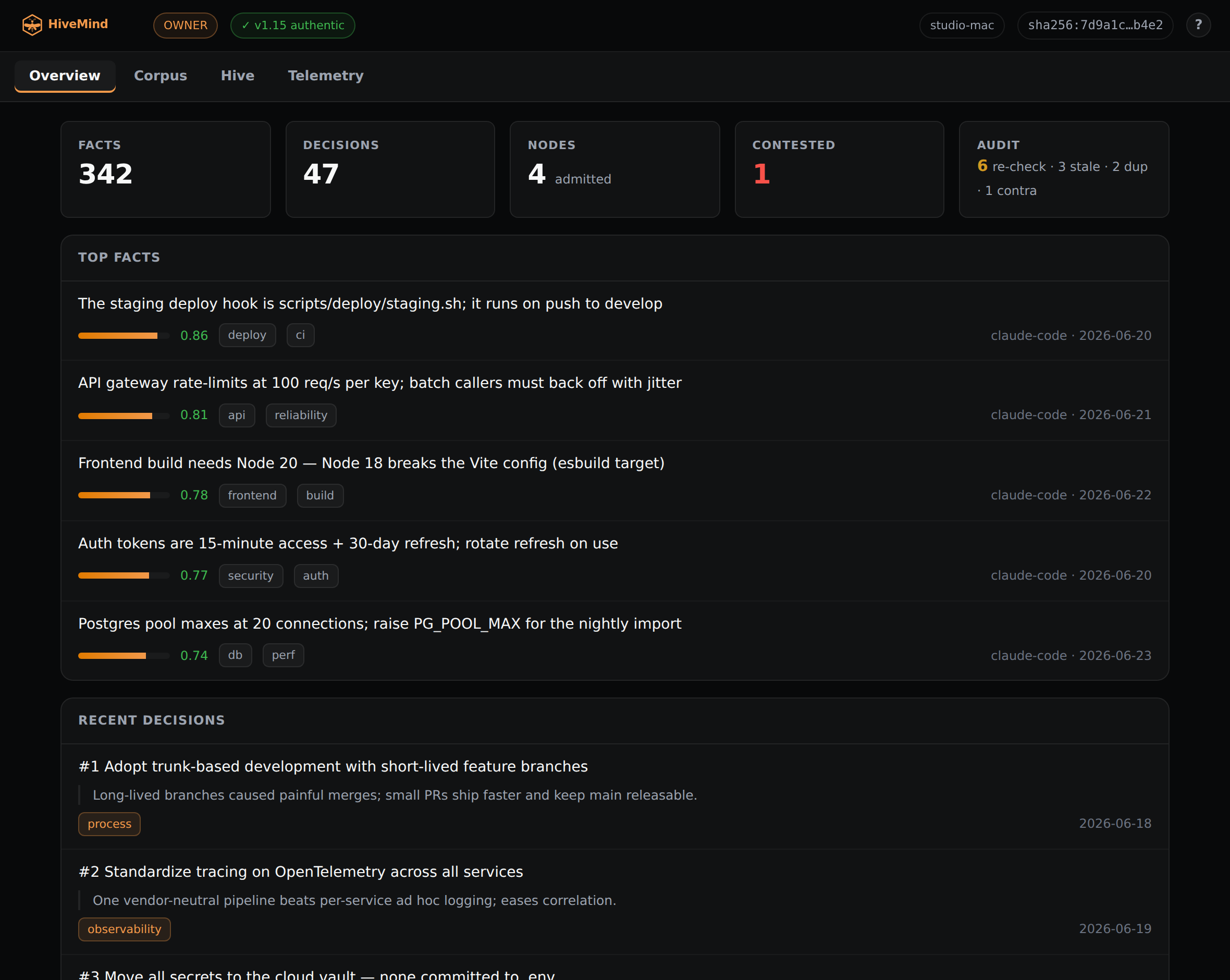
HiveMind dashboard, Overview tab

The Overview tab. Every count is a link to what it counts.

Overview

The size of the hive, contested facts, and the boot audit, with your best facts and latest decisions underneath. Every count links to what it counts.

Open →

Corpus

Search facts and decisions together. Filter by tag, sort by salience or recency, and open any record with the facts that relate to it.

Open →

Hive

Every admitted device with its address and live sync status. Click a node to open its own detail, proxied over the tailnet.

Open →

Telemetry

Each node's session telemetry, pulled together live: sessions, time, tokens, and cost, with per-day and per-model breakdowns to sort, filter, and drill.

Open →

Admin mode Planned

The write side, opt-in and identity-gated: admit and revoke devices, retract and re-confirm facts, and record decisions from the browser.

Open →

Read-first, and provably genuine

Out of the box the dashboard observes and never changes the hive on its own; the write controls wait behind admin mode, off by default and tied to your node identity. The shield in the header reflects your live hv verify result: a green shield for a genuine install, a red one with the steps to re-align for a modified copy. Use only the official HiveMind from ProjectMentor.

What's next

HiveMind already gives you one shared memory across your machines. Here is where it is headed.

Federated hives Planned

Today one hive spans your machines. Federation will let separate hives (your personal hive, a team hive, a project hive) selectively share what matters, so groups can pool knowledge without merging everything into a single pool.

More platforms Built

macOS, Linux, Windows (via WSL), and Android (via Termux) all run HiveMind, so every device you work from can join the hive.

MCP for Claude Desktop Built

A local MCP server connects Claude Desktop straight to your hive, so you read and write your shared memory from the desktop app with no copy-paste.

Get started in one command

# Install $ curl -fsSL https://raw.githubusercontent.com/projectmentor/hive-mind/main/scripts/installer/install.sh | bash $ hive-mind install

Try it out

# Store something $ hv remember "The payments API rate-limits at 100 req/s" --tags api,payments # Find it later $ hv search "payments" # Sync with your other machines $ hv sync now # See what's in memory $ hv stats # Add a device: it joins read-only (sterile) until admitted $ hv whoami $ hv admit # on the owner, promotes sterile → fertile, once

Background sync runs as a user service named hive-sync (systemd on Linux and WSL, launchd on macOS), so devices stay in step without you running hv sync by hand.

Support HiveMind

HiveMind is free and open source under the GNU AGPL v3.0. If it helps you, a small donation keeps it alive and independent. Want to get involved instead? Contributions are welcome.

❤ GitHub Sponsors ☕ Ko-fi 🥤 Buy Me a Coffee ⌨ Contribute